SPARSH — the defence pension portal
SPARSH (System for Pension Administration — Raksha) is the Ministry of Defence portal that now runs defence pension: PPOs, monthly pension slips, identification, claims — all of it. There is exactly one official address: sparsh.defencepension.gov.in — avoid look-alike addresses.
This section explains SPARSH tasks step by step — each guide written against the official instructions, with the places people actually get stuck.
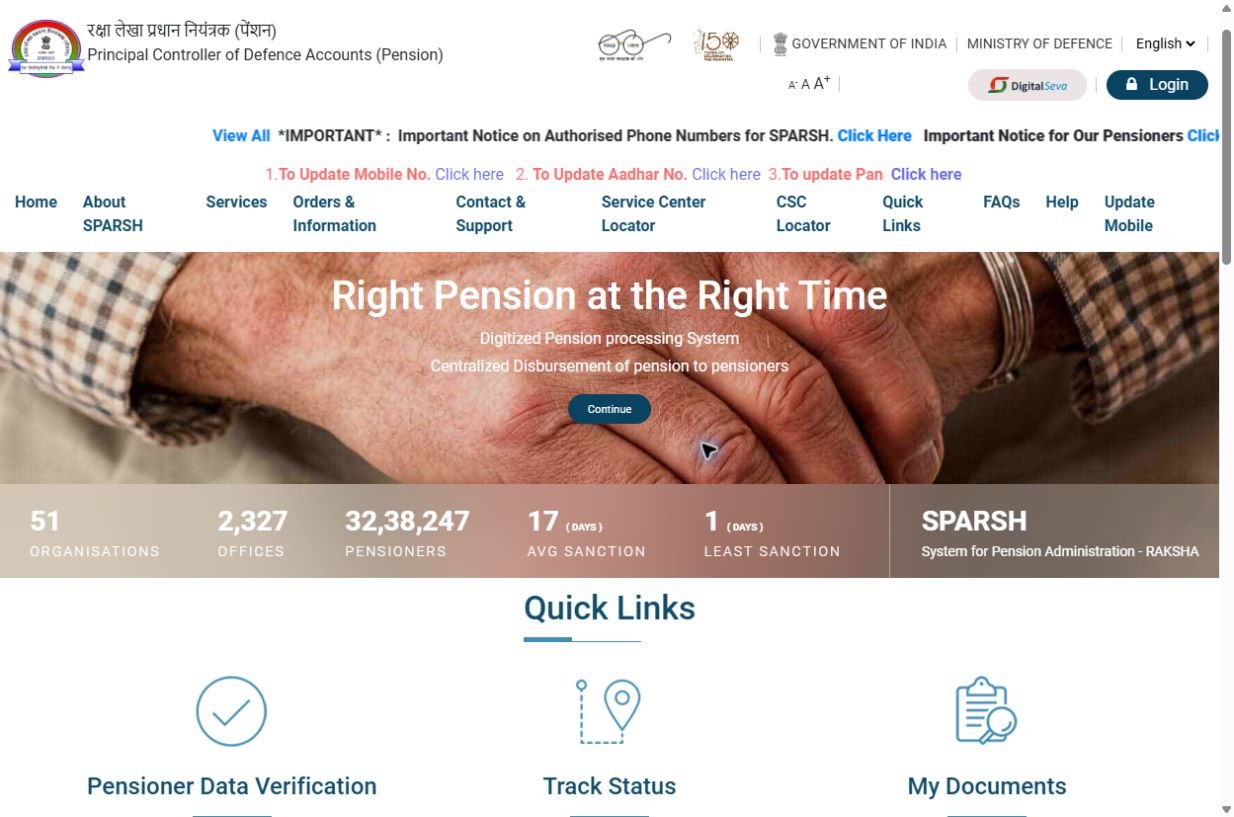
- 1Login: use the dark button at the top-right. Never enter credentials on a similar-looking address.
- 2Services: the public menu shows the tasks available before login and official help paths.
- 3My Documents: after login, this is where PPO, entitlements and monthly pension slips are accessed.
How every visual guide on Sainik Desk is made
- Open the official public portal and verify its web address.
- Use a real screen—never redraw or invent an app screen.
- Remove or cover name, PPO, Aadhaar, phone, account number and any location before saving.
- Add numbered markers outside the original interface, then write the exact action below the image.
- Print the capture date and re-check the screen whenever the portal changes.
- Employment/Re-employment declaration→ Verify the real form before changing your status
- Projected Tax Summary→ Generate the correct financial-year report safely
- Commutation Details in SPARSH→ Understand portal fields and compare with the calculator
- Change of FMA Option→ Understand the Stoppage of Medical Allowance form before submitting
- Register and track a SPARSH grievance→ Choose the issue, attach proof and avoid duplicate requests
- How to check or update your registered mobile→ Real Personal Details screen and the correct official route
- Complete logged-in SPARSH account guide → Real screens: profile, documents, grievance, tax and service requests
- Forgot your SPARSH password? → Real screens: OTP, one-time password and password reset
- How to submit your life certificate from home → Step by step — including where people get stuck
- How to download your pension slip → Login user ID, the My Documents path, and the complaint routes
- How to download your PPO → Get the most important pension document out of SPARSH
- Pension not credited this month? → The checklist, in order — and the official complaint routes
- Where is my PPO number written? → Four places to look — and why your SPARSH user ID already holds it
Important note
This site is not SPARSH and not the government — we only explain the process. Always do the actual work on the official portal.