SPARSH Employment/Re-employment Declaration
Do not copy a choice from any screenshot. A false employment declaration can affect official records. If its pension or tax effect is unclear, confirm with your Record Office, pension authority or official SPARSH support before proceeding.
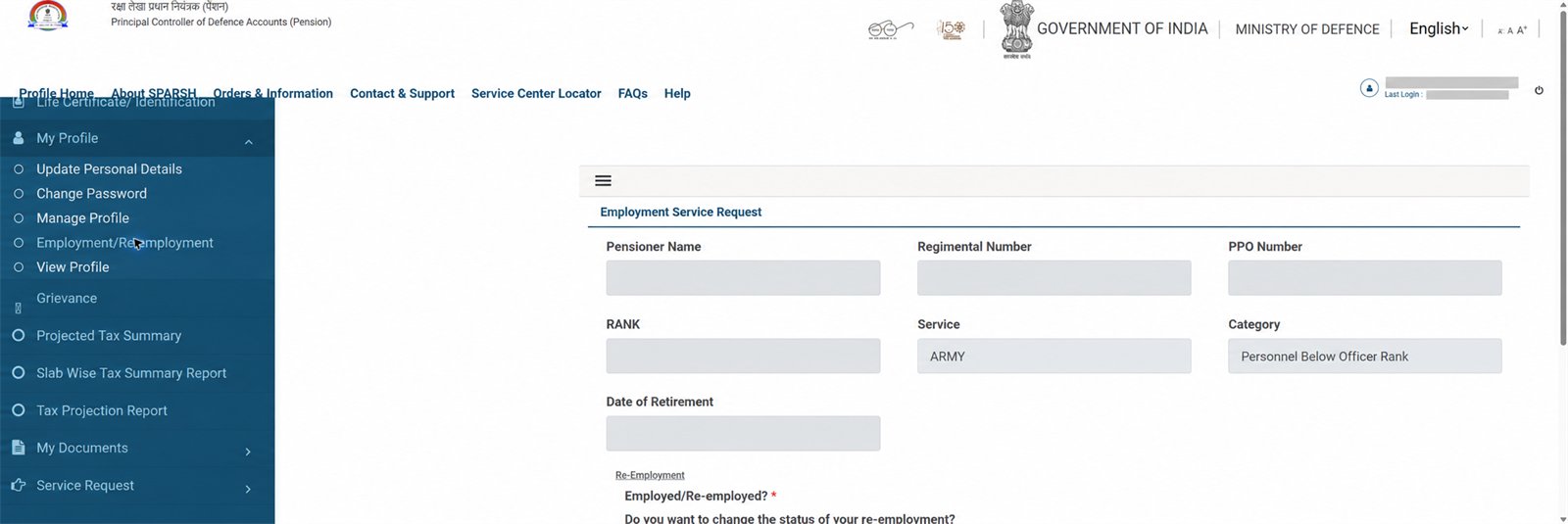
Open the form
Log in to the official portal and choose My Profile → Employment/Re-employment.
Verify the prefilled particulars
Check name, regimental number, PPO number, rank, service, category and retirement date. Do not continue with a material mismatch.
Answer for your actual status
The screen asks whether you are employed/re-employed and whether you want to change that status. Select only the answer true for you.
Proceed carefully
Choose Proceed only when ready, then supply only the details or documents requested in your own workflow. The captured first screen did not show a universal document list.
Save and track
Keep the acknowledgement/service-request number and track it through Track Status. Avoid a duplicate request while one is pending.
Important
This is an independent navigation guide, not legal, pension or tax advice. No declaration was selected or submitted while capturing the screen.
Related: Account guide · Projected Tax Summary · Grievance guide